Saturday, May 11, 2013

Tutorial: Tissue Paper Photo Album for Mother's Day

I was so surprised that Mother's Day was THIS Sunday!  I thought I had another week so yesterday I scrambled for a gift idea.  I decided to make a brag book for my Mother-in-law and a 6 x 6" album for my mom.  It would give me an excuse to try a new technique I learned from a Pin on Pinterest last week.  Sarah at Sarah's Never-Ending Projects had a fabulous tutorial on her blog for printing photos on tissue paper and then modge podging the tissue paper onto canvas.  I had never seen this technique before and was looking forward to an excuse to try it.  Now I was in need of a heart-felt Mother's Day gift...and I had a plan.
I remembered the 2 pack of mini album's at Michael's for $4.99 that I had put in my basket on several occasions, but then promptly removed because my "want vs. need" reminder started pinching me.  Wouldn't it be cool if I could Modge Podge photos printed on tissue paper to the cover of these memory books?

So I scurried down to Michael's to use my 40% off coupon and then rushed home to get started.  Because I knew I wanted to make this project a tutorial I decided to experiment rather than focus on following the directions to the letter.  If the albums turned out disastrous, I could always buy a plant.

The step by step instructions for this project are in red. My commentary is italicized and in black .  I do this because once you get started assembling, you are going to want to find the next step quickly before your Modge Podge dries.

Printing Photos on Tissue Paper
1. Place a 8.5 x 11" sheet of printer paper on the top of a sheet of tissue paper.  The crisper the tissue paper, the better but even a crinkled old piece leftover from Christmas will work.  There are, however, a couple of potential problems with "used" tissue paper you should consider.
  • The wrinkles will be visible on your photo when you Modge Podge the paper down.  If you are hoping to use a dewy face photo of yourself when you looked like a 20 year old, wrinkled tissue paper will put a damper on your plans.
  • The more worn the tissue paper, the more vulnerable it is to tearing when you are sealing it with the Modge Podge.  This happened to me with a brand new sheet of tissue which was such a bummer.
2. Match the top left corners of the tissue paper and the printer paper so that two (top and left) of the edges are lined up as in the example below.

3. Use a craft knife to cut the tissue paper leaving approximately one inch extra on the right and bottom edges.

4. Use a straight edge to cut precisely along the right edge so that the tissue paper width is the same as the as the printer paper.  Leaving even a little extra tissue paper on the edge might cause your printer to jam.   
The first time I made this cut I used the tip of my blade to cut the tissue paper.  This caused the tissue paper to bunch and then tear leaving jagged edges (see the "V"-like rips in the pic above.)  

The next time I used the edge of the blade, holding the knife at an angle so the blade lay flat.  I sliced very lightly and went over the cut several times.  Then the cut was perfect.
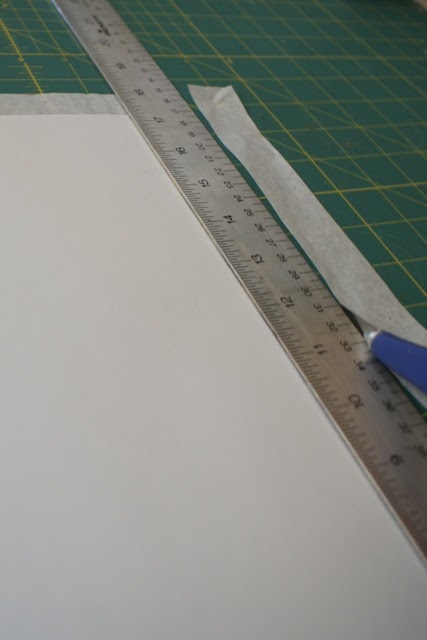
You can see the angle a little better in the photo below.

5. Once the widths are the same, place the 8.5 x 11" paper in the center of the tissue paper so there is a .5" lip on both sides(Note: I rotated the paper in the photo below so I could use the measurement lines on the mat, but it is still the same paper and what now appears to be the width is actually the height from the photos above.) 

6. Fold the .5" lips over the edges of the printer paper and tape them down using scotch tape.  I taped the entire edge down to avoid a printer jam.  The image below shows the tissue paper taped down.
There was a bit of a bubble where the tissue paper was originally folded inside of its packaging (see in photos below.)  This made me a little nervous, so I taped the side edges in a few spots just to be safe.
That gap in the photo above looked like trouble so I added a few strips of tape to keep the tissue paper from bunching in the printer.
7. Next load your paper in the printer- make sure you know which side the image will print on.
I thought I knew, but I was wrong. :o) All I had to do was flip it over and print again.
You can barely see the difference between the tissue paper and printer paper images when the tissue paper is still taped down.
Adhering the tissue paper photo to your project
8. Holding the tissue paper down firmly, use a straight edge and a craft knife to cut each image out.
I sliced light enough that the printer paper underneath was not cut.  This allowed me to cut out the pictures I accidentally printed on plain paper so you can see them side by side.
The photos on the left are on on tissue paper and the pics on the right are printed on the regular copy paper.

9. The next step is to paint Modge Podge over the top of the album.
I almost put the tissue paper photo down but I didn't think it looked any different than if I had adhered a regular photo so I decided to experiment.
First I put down a patterned piece of tissue paper to add a little more color.  It was a used piece of tissue paper so it laid down very wrinkly and tore when I was attempting to smooth out the bubbles.  Regardless, I didn't like the look at all.  

I was about to panic but I noticed this paper towel I had been hoarding for years.  I had literally been holding on to this paper towel for 4, maybe 5 years.  I had used it to clean up paint after I finished a project and thought it looked like hand made paper so I put it into my stash.  I would finally put it to use by Modge Podging it onto my album cover.
I felt it offered a bit of dimension and the colors complimented the photo.

I reapplied the modge podge to the album cover and...
10. Then press the paper towel onto the wet Modge Podge, using your hand to smooth the paper towel so that every bit of it is stuck to the album. 
As you can see in the photo above, the wrinkles were pretty pronounced which meant that the tissue paper photo would get really bumpy if I placed it on top.  I decided to use gesso to fill in some of the cracks.  I put it on pretty thick and went to the gym to give it time to dry.
When I got back I applied Modge Podge and laid down the tissue paper photo.  There were still wrinkles but for the most part it mounted nicely.
- To blend the edges of the photo to the book cover,  you can smudge color coordinated paint around the frame. In this case I used white and pink paint but it was lost amongst all of the paper towel dimension and the vibrant colors in the photo.

  
- You can also use Washi tape, ribbon or lace to frame your photo. Embellish the frame with flowers, buttons, butterflies or any other bits that would compliment your photo.
I used a beautiful print Washi tape which was lovely and added several Prima flowers with button centers. 


On the album below, I left the background white and used white paint to blend the edges.  This cover almost looks like a painting.  It is very cool.

I am so happy with both albums and with this new technique which will work with so many other kinds of projects.  I hope you find this tutorial useful.  Please let me know if it is confusing so I can make adjustments.  Happy Mother's Day!

Friday, May 10, 2013

Tissue Paper Modge Podge Albums

I made these albums today after a lot of experimenting and it was so much fun!  The photos were printed on tissue paper and modge podged onto the books.

I took loads of photos and jotted down my process as I went along so I can blog the tutorial step by step.... tomorrow.  I am just way too tired to manage a keyboard right now but I will post the whole enchilada tomorrow. Sweet dreams.

Wednesday, May 8, 2013

Stretch Your Imagination Cricut Cartridge Table of Contents

I want to meet the designer who came up with the concept for the Cricut cartridge Stretch Your Imagination.  The artwork is so much fun and inspiring.  Every time I look at the graphics I feel a little whimsy sweep over me.

You can see the playfulness come through in other artist's work too.  Take a look at this adorable card by cuddlebug_fan at Leirad's Corner. Her work is impeccable, the detail is wonderful, but the wonky baby carriage makes the card totally fabulous!


And look at this card by Jeri at Bug 'n Me Creations. Jeri added some super cute details like the white dashes on the spider legs and thematic embossing.  On it's own it would be darling, but those long legs are fantastic and take the card to a whole new level!


This card by Jaqui J at Creative Today is absolutely marvelous.  The stretched babies are as fun as fun can be, turning embellishments on a plain white card into a playful little dance of baby fun.


This cartridge has a large variety of images in regular and stretched sizes as well as a card, frame and a silhouette.  
You can see that all of the holidays and seasons are covered as well as a number of decorative elements including tags and swirled silhouettes.

Lets take a look at a page from the handbook.
In this example, there are 2 primary images- a "2-pumpkin" character and a stretched "8-pumpkin" character. Both of these images have a layer, a silhouette, a shadow and a blackout. 

At the bottom of this page is a jpeg with a list of the words/ expressions and a list of the images on the cartridge. The list is sorted alphabetically and has the page number for each line item.  If you would like a pdf of this information, you can download it by clicking here: 
  
If you find any errors in the spreadsheet, please let me know so I can correct them. If you would like to share this information on your blog, instead of copy and pasting this info, please paste a link to my site.


Tuesday, May 7, 2013

Sn@p Album in progress

April was an adventurous month in my crafty world but I didn't manage to post many photos or project  updates.  Now that I have finally edited the photos I took along the way, I am going to bring you up to speed, starting with my Sn@p album by Simple Stories.

When the SN@P album was first revealed at summer CHA, I went coo- coo for coco puffs.  I didn't indulge in the Project Life craze because I just didn't need to fall behind on one more thing.  I played with the idea but I wasn't crazy about the color schemes and the 12 x 12" design was just too intimidating.  Sn@p was colorful, compact and I *loved* the mix and match pages.  Yes there were other lines offering similar album styles, but the whimsy of the color scheme "had me at hello."

When it Sn@p finally arrived at my LSS in October, 2012, I bought a nice stash of supplies which I immediately put on display, front and center, in my scraproom. Here they would sit for 6 months, literally gathering dust. Neither adhesive nor scissors touched my Sn@p supplies until April, 2013.
As you can see, my March calendar isn't very full.  I'm thinking of adding dates and pages containing headlines, trivia and activities from our family calendar. Page content and photos can come from Facebook, web searches and email.
My Selphy printer relieved my anxiety about all the trimming I would have to do to make the photos fit into the small photo sleeves. This is what got me started.

I just can't stand my handwriting.  No matter how slow I go; regardless of the writing instrument, it is a hot mess.  Unpredictable, unreliable and all around sloppy.  

To add insult to injury, I can't spell.  There- I said it out loud.  La-dee-da-dee-da! I am a lousy speller and I'm too lazy and/ or rebellious to look words up in a dictionary or via MS WORD spell check.  But I have made a pledge that I will write at least 77.63% of the words in my Sn@p with my own writing. It is unattractive and won't get my pages pinned on Pinterest , but it is honest and sort of the point to this kind of album. So not only is it a dandy of a little memory book, it is also an exercise in humility.  

Regardless of my penmanship, I will post my progress in hopes that it will inspire those of you who also have handwriting hyper-phobia. If i can do it, anyone can.

Monday, May 6, 2013

Disneyland Mini Album Tutorial


Where to start...  
My absence wasn't very polite and perhaps my Disney Passport/ guidebook/ memory album will give you something to play with and shed some insight as to why I have been distracted.

During the month of April, my husband and I whipped together an amazing adventure to Disneyland to celebrate his last chemotherapy treatment after a year of horrible medications, side effects and over-all stress on our family.  While they hadn't detected any sign of his disease for 6 months, the doctors feared he may relapse so they had extended his drug cocktail twice, making a 26 month treatment into 50.  It was finally over and we wanted to punctuate this marker for our children who had seen their daddy sick, depressed and exhausted.

It was to be a surprise so I was busy behind closed doors making mini albums, packing goodie bags and creating all kinds of treats.  The biggest project was creating "Disney Passports" (mini albums) for the kids.

The Disney Passports included maps to both Disneyland and California Adventure and descriptions of all the rides in both parks that were age appropriate and would be in operation during our visit.  What I mean is that I did not include baby/ toddler rides because I was trying to conserve space and did not include the rides I knew were closed for renovation so they wouldn't be disappointed.

Each Park and Land had a tab and I included the schedules of the various parades and shows.  There were extra pages for notes and ephemera and there was also a pocket page with six little baggys containing shiny pennies and a quarter so they could put them in those machines to get them stamped into a souvenir. FYI - those machines now cost $.50, not a quarter.

I also created coupons for both days we would be in the park in anticipation of bickering.  Unbeknownst to me, Disney magic cures all sibling fussiness.  The constant arguing I have come to know and HATE never showed its face, not once, during our entire vacation.

 
Disney Passport / Memory Book Tutorial

Cover
  • The exterior cover was made with chipboard'ish material (which means semi-pliable). I wanted to have an extended lip on the edges of the cover preventing the tabs from sticking out too far and getting smashed or peeled off so I used the back page of a K&Co paper pad which is 12 x  12.75" in size. There was a hole punched at the top for retail display purposes, which I planned to use for a ribbon to hold the book closed.
  • I folded the chipboard with the rough side up so that the slick white side became the interior cover pages. NOTE - I attempted to score the chipboard (even lightly with a craft knife) but I still ended up with the crinkly fold and uneven edges. The paper cover and the interior bulk would make this fact irrelevant so don't stress if you run into the same problem.
  • I used navy blue glittered paper - Joanns brand, to cover the chipboard.  The paper was 12 x 12.5" because of the extra strip at the end.  Since the paper was shorter than the chipboard and would also need to be extra wide to account for the spine and bulk of the book, I ended up trimming .25" off of each end of the chipboard leaving the chipboard sheet at 12 x 12.25. The hole was now very close to the edge because I had trimmed off .25" so I adhered a paper reinforcement dot before I put the cover paper on the chipboard.
  • I used Tombow liquid glue to adhere the paper to the chipboard (while it was unfolded) edge to edge leaving a 1/8" lip on both edges. I did this while the glue was still wet and then folded the book with the paper (un-scored) so that the paper slid into place.  I then punched a hole in the paper over the chipboard hole in the card stock.
  • I covered Maya Road chipboard stars with yellow card stock, inked, printed the Mickey with each child's name, etc. and used my circle punch to the cut the hand made logo out. 
Interior
  • All of the information in the booklet came directly from the Disneyland website.  I just copied it, then pasted it in a MS Word document using "Paste Special"-> Unformatted Text.  This converted the HTML with assigned font, font size and other formatting into my default settings in word.
  • I printed the passport information (see below) on 8.5 x 11 paper.  To get the booklet formatting, I selected "Print"-> "Properties" (on the print screen) -> then on the "Duplex/Booklet' drop down menu, I selected "Booklet" and MS Word automatically converted the document so that the pages were split in half and correlated into proper order when layered and folded.
  • I folded each page in half and used my bone folder to flatten the creases to eliminate as much bulk at possible.  
  • I used my long arm stapler to staple on the spine and Voila', I had a "signature". 
  • I attached the booklet to the cover with a rubber band through the middle of the signature.  
  • To cover up the rubber band and add some customized embellishment, I tied a large red ribbon in the same manner.  I attached hand made charms to the ribbon with their initials, stars and hearts using trimmed ball chains and large jump rings.
  • I tied a long but thin red ribbon in the front cover hole which I used to wrap around the book several times and tuck to hold it as closed as it good go.
The Maps
  • I printed the maps on 8.5 x 11" paper and used my xyron to laminate them.
  • I scored down the middle on both sides, then folded the maps in half, using my bone folder to enforce the crease.
  • I adhered the maps onto the interior covers using Tombow liquid glue.
The Tabs
  • I printed the tabs on "Printable Self-Adhesive Tabs" by Avery (16280 - 1 1/2" x 1")
  • I had a heck of a time with the formatting and eventually called Avery to help me.  The downloadable MS Word formatting template is on this page on the left.
  • I printed each park and land on the tabs and adhered them to the pages.
Content
Below is a link to the PDF of these books which you are welcome to download.   If you would like to share this information on your blog, instead of copy and pasting this info, please post a link to my site. 


The books are formatted to print as booklets and double sided.  I don't know how that will work if you do not have a printer that prints front and back.  Perhaps you can change the formatting in Adobe.  If not, leave a comment saying you would like me to email you a copy in MS word so you can manipulate the settings.

Below is the link to the PDF of the park maps that are edited to accompany the guide.  I edited out the legends to keep the map size large enough to read and pasted the legends into the content (included in the PDF above). 


I also put together goodie bags for the kids to carry in the park. It is amazing how many Disney characters can be found on everyday products!

I bought the backpacks (blue, pink) and cups (blue, pink) on Amazon and the tissue, wipes, autograph books and fans came from the Dollar Tree.  The T-shirts came from the Disney store in our mall (2 for $20).  The blue backpack was plain (I ordered a green one for me and am still using it as a purse) so I ordered the "Abu" patch (Aladdin's monkey friend) and ironed it on (VERY CAREFULLY) to make it "Disney".

I gave the kids these bags and books when we told them we were going to Disneyland.  The "reveal" was definitely one of my favorite parts of the trip and we have it all on video!

This chapter has so much more to it which I'm thinking about sharing on a Disney specific page.  I searched and searched for information about Disney before we went and I just love to share what I know.  what I will tell you is that this trip was one of the the most amazing experiences of my life (in my top 10 for sure!) and I have been floating with true joy; that kind of joy that sometimes evades me for months at a time; ever since we got home.  Even after a new chapter of our life began...

I am sad to say that one week after we returned from Disneyland the results of my husband's final blood work came back and his disease has returned. It appears to have mutated and is drug resistant to the most powerful drug protocol available at this time.

Please keep us in your prayers.  We are spiritual people and believe that God blessed us this once-in-a-lifetime vacation together.  It seems silly to credit a trip Disneyland in the face of a terminal illness but I guess that is why they call it the Magical Kingdom.