Wednesday, August 29, 2012

5 scrapbook complications that chap my hide.

I don't know about you but sometimes when I scrapbooking I'll have an issue with a tool, product or situation and it occurs to me that this has happened before.  In fact, it occurs more often than not, yet I neglect to address it because, "Hey, I'm busy scrapbooking!" and then I forget about it until the next time it happens.  I decided that today I would take a look at my top 5 scrapbooking annoyances and some ideas on how I might avoid them.
  1. ANNOYANCE: This drives me MAD! I will be working on a project and I need to run glue along the edges of a piece of paper or photo with a tape runner.  In my effort to get those edges glued, I leave a side trail of adhesive on my work surface.  Next thing I know, I've set my photo or an embellishment face down on top of the glue and now I've got a tragedy. I've either ruined the photo or torn off the top layer of the paper/ embellishment.  Man that drives me CRAZY!  And yet, I find myself in the same predicament time and time again.  SOLUTION:  Get yourself a little pile of old magazines and when you lay down adhesive, do it with the magazine underneath.  When you are done gluing, turn the page of the magazine and the mess is gone. 
  2. ANNOYANCE: Oh, this one is so irritating!  Sometimes when I am inking the edges of paper, photos and everything else we scrapbookers ink, I get "ink rub" on the front of my card, layout or project.  Sometimes I call it a happy accident and roll with it, but when I am creating a clean, crisp layout and I get "ink rub" I just about lose my mind.  SOLUTION: Okay, so I 'll mention the obvious one; slow down.  And when that doesn't work because you only have 45 minutes before the kids get home from school, try dabbing the edges lightly rather than running the ink pad along the rim of the paper/ picture, etc.  If that doesn't work, you could try to cover up the messy spot with journalling or an embellishment and call it "whimsy." I welcome any other ideas on this one because I don't see myself slowing down or dabbing on a regular basis.
  3. ANNOYANCE: This is a real stinker of a dilemma and it has a pretty simple solution.  "Infecting" a layout/ project with messy hands.  It is inevitable (and quite honestly, my right, as a crafter!) that my hands will get soiled with ink, paint, glitter, glue or some other creative medium.  I know I should stop what I'm doing and clean my mitts but sometimes its difficult to get to a sink or else, I am unaware that I rubbed the side of my palm with a cats eye.  SOLUTION: This one is easy peesy cotten cheesey - stash baby wipes everywhere.  In your scrap tote, paint storage cupboard, desk drawer, in your tool bin, everywhere.  Get 4 or 5 travel packs and scatter them where you do your work..  Then make a habit of wiping your hands regularly.  Also, this practice is a good habit for removing germs - sort of a win/ win..
  4. ANNOYANCE: Maybe its old age, maybe its mommy brain, it doesn't really matter why.  The fact is that I seem to loose everything that I had in my hand 2 minutes earlier.  A photo, a button, my scissors, a sheet of paper - you name it, I've lost it right in front of my own eyes.  SOLUTION:  Make a "hot plate."  Grab a paper plate and put it to your direct right before you start scrapping.  Every time you set down photos, buttons and many of the other things that seem to vanish, place them on the hot plate.  Disclaimer: In my experience, this method works for most things but scissors seem to know how to crawl off of the hot plate and under scraps.  I usually pull out 2 or 3 pair when I'm scrapbooking and even then, I have to hunt them down.  Them scissors are tricky.
  5. ANNOYANCE: This one doesn't effect everyone but it sure is a problem at my house.  I call it "cat crinkle."  No matter where I work, my cat seems to hone in on my projects and just when I least expect it...Bam!  He jumps on top of my paper and wrinkles it or leaves a wet paw print or scatters an un-adhered design all over the place.  I love you kitty, but this is unacceptable.  SOLUTION: I'm afraid there isn't one friends.  Unless you are willing to put kitty in a crate or lock yourself in a room, kitty will always go for your artwork.  It is how they are hardwired.  Its in their DNA.
Well that is all of the wisdom I can muster today, but I eagerly encourage you to share your own.  Please, if you know a solution to these 5 issues, leave a comment so we can benefit from your experience.

Tuesday, August 28, 2012

Meet the Cricut Cartridge, "Paper Play"

 
Today we are going to look at one of Cricut's newer cartridges, Paper Play.  This is not your standard Cricut cartridge in that it is project oriented rather than image oriented. To elaborate, this is the description on the Cricut website:
"This cartridge is filled with fun little projects such as puppets, dolls, and a cootie catcher. With Cricut Projects cartridges, you can create unique and customized projects for your home, family, and friends.  The versatility of the cartridges will surprise even the most imaginative crafters"
I agree that you get very unique projects with this cartridge and they really are darling. There is a randomness to the cartridge however, because they are not within a single motif, but because I have kids and work with kids, almost all of the projects are relevant for me. 

I'm a big kid at heart so immediately after bringing this cartridge home, I created the car.  My kids were really impressed and said I was the best artist in the whole world.  I just love that!
 I used my Imagine so instead of cutting out each element with different colored pieces of paper, I just told my machine what colors I wanted and it printed and cut the entire project on a white piece of card stock.  I do not recommend using a heavy weight cardstock as it can be a little too bulky for some of the folds.  I used a heavier weight cardstock on the car and it had problems holding its shape.  I scored all of the fold lines and I used Tombow glue to adhere it together but the paper still had some "bow" to it and eventually some of the seams came apart. The middle weight cardstock is much easier to manipulate while still be durable enough to support itself.
Above is a view of every one of the projects on the cartridge.  

The first 19 pages of the handbook show each of the projects and the layers you need to cut to construct them.  Pages 20 through 51 offer picture instructions on how to assemble the projects.  The instructions are very similar to the ones you get with furniture from Ikea.  There are no written directions, just a graphic of each stage of the assembly as you can see below:

Above you see an image of the Nestling Doll project (R) and the different layers you will need to cut to construct it (L).  Below each picture of a layer is a picture of the cartridge overlay with the key you will need to press to cut that layer, highlighted in red.  Below are the step by step instructions on how to assemble the Nestling Doll project

 
 I found these instructions fine for assembling all of the projects except for the darn cootie catcher.  I've been trying to figure that one out all summer and I still cannot make it work.  There are 6 year old kids out there whipping cootie catchers together with binder paper and I can't seem to assemble one with step by step instructions!  In my own defense, these cootie catchers have bits and pieces glued on them so the bulk makes the folding a little more disagreeable.
This is a link to the PDF version of the Paper Play handbook on the Cricut website.

Last but not least, here is a list of all of the images (there are not any phrases) on this cartridge with their page numbers.  If you find any errors in the spreadsheet, please let me know so I can correct them. If you would like to share this information on your blog, instead of copy and pasting this info, please paste a link to my site. The spreadsheet below is a JPEG but you can download a PDF version of Paper Play here: 

Sunday, August 26, 2012

Comprehensive overview of Cricut cartridge "Kate's A B C's"

Kate's ABC's might be the "cutest" cartridge out there.  It is full of adorable things: kittens and bows and hats and purses and butterflies and flowers and so many girly things that I couldn't resist buying it!  As soon as I got it home I cut 10 teacups and made note cards.  In this post we will look at:
  • a brief list of themes that this cartridge would work with
  • a Sample view of the cartridge images
  • a look at the font and a PDF reference sheet download
  • a look at all of the phrases offered on the cartridge and a PDF reference sheet download
  • a look at a handbook page with an explanation of all of the Creative Feature Keys
  • a link to the PDF of the handbook
  • a spreadsheet with a list of the cartridge images, words and phrases with their corresponding pages numbers and a link to download the PDF copy.
A Sample view appears on the back of each cartridge box and usually shows a portion of the images that can be cut with the cartridge however Kate's ABC's shows all of the primary images in its Sample.  That the artwork on this cartridge is not limited to sugar and spice and everything nice.  You can embellish a lot of different subjects including:
  • baby
  • garden
  • tea
  • home
  • Easter
  • Mother's Day
  • Love
  • nature
  • girlfriends
  • shopping
  • Get well soon
  • Thank you
  • invitations
  • relaxation
  • birthday
  • summer
  • picnic and more....
In addition to the primary images shown on the sample above, you also get a font and it's shadow.  The font includes both upper and lower case letters, numbers 0-9, punctuation, assorted symbols and 13 icons.

I have a hard time judging how a font will look as a word unless I see the letters next to one another so I created this Font Quick Reference Sheet. You can download a PDF copy of the Kate's ABC's Font Reference Sheet by clicking the link below.  If you would like to share this information on your blog, instead of copy and pasting this info, please paste a link to my site:


This cartridge also includes 26 phrases that coordinate with the letters of the alphabet.  I can't think of how you would use those phrases other than in a alphabet book or in a decor project.  Fortunately there are additional layered phrases like "BFFs," "Playtime" and "Tea Party". Many of the layers include artwork that is designed to create dimension but many images can also be used on their own.   Below are all the phrases that are included on this cartridge with their page numbers.
It used to take me forever to flip through the handbook to find that perfect phase to use in a card or to title a layout but then I created this phrase reference sheet which has made the process a lot easier.  You can download a PDF copy of the Kate's ABC's Phrase Reference Sheet by clicking the link below.  If you would like to share this information on your blog, instead of copy and pasting this info, please paste a link to my site:

 
This is a page out of the handbook.  On the left you see what you can make by pressing the red key on the keypad below.  You use the various Creative Feature keys to build the final image.
 
I have added letters to each of the squares to explain how to build the primary image, the phrase and the font(s).
  • A - this is the primary image plus a copy of the overlay/ virtual keypad highlighting the key the page references in red.
  • B - this is the base of the primary image .  All the other layers will be stacked on top of it so only the bonnet, cats and buggy tires will show through. The example is cut with brown paper but you can use whatever color you would like.  For example, cutting B in white would create a white bonnet, cats and tires.  Cricut will cut B when you select the red key on the key pad.
  • C - this is the grass layer and should be stacked on top of B.  Cricut cuts this when you select the red key and shift
  • D - this layer is cut by selecting the red key and the Layer 1 creative feature button. D cuts the girl's jacket, the bonnet ribbon, the creases on the stroller sun shade and the flowers on the grass and her bonnet. 
  • E - this layer is cut by selecting the red key, the Layer 1 creative feature button and shift. E cuts the stroller, her jacket pocket and the stroller tire rims.
  • F - this layer is cut by selecting the red key and the Layer 2 creative feature button. F cuts the skin of the little girl (face, hands and feet).
  • G - this layer is cut by selecting the red key, the Layer 2 creative feature button and shift. G cuts the girl's hair and the cat's collar. 
  • H -  this layer is cut by selecting the red key and the Phrase creative feature button. H is the base layer.
  • I - this layer is cut by selecting the red key, the Phrase creative feature button and shift. I is placed on top of H to create dimension and add contrast (you would cut this layer with a different colored paper than H).
  • J - this layer is cut by selecting the red key and the Baby Girl Font 1 creative feature button. This is the cartridge font "negative" inside a scalloped square.
  • K - this layer is cut by selecting the red key, the Baby Girl Font 1 creative feature button and shift. This is the shadow of cartridge font "negative" inside a scalloped square and goes under J.
  • L - this layer is cut by selecting the red key and the Baby Girl Font 2 creative feature button. L is the lower case.
  • M - this layer is cut by selecting the red key, the Baby Girl Font 2 creative feature button and shift. M is the upper case.
  • N -  this layer is cut by selecting the red key and the Baby Girl Font 2 Shadow creative feature button.  N is the lower case shadow.
  • O - this layer is cut by selecting the red key, the Baby Girl Font 2 Shadow creative feature button and shift. O is the upper case shadow.
To download a copy of the Kate's ABC's handbook visit the Cricut website here or you can click below:
 

Last but not least, here is a list of all of the images and phrases on this cartridge with their page numbers.  If you find any errors in the spreadsheet, please let me know so I can correct them. If you would like to share this information on your blog, instead of copy and pasting this info, please paste a link to my site. The spreadsheet below is saved as a JPEG but you can download a PDF version of Kate's ABC's here: 


Saturday, August 25, 2012

and the winner is....

Thank you everyone who participated in this drawing!  I was wishing I had the financial resources to give a smash pack to each and every person who left a comment.  Maybe someday...  Well without further ado....  Random Generator picked #7


Dee is our winner!  I will send you an email to get your information.!  have a wonderful Saturday and check back tomorrow as I will be posting another cartridge overview!

Thursday, August 23, 2012

Smash Pack Giveaway!

First, let me say that I have been having so much fun getting to know you and am so appreciative of your kind comments here and on the message boards. I work from home and have a very busy mommy life so I rarely get to interact with others who share this amazing passion.  Posting information and inspiration is just an extension of my love for scrapbooking and it helps me feel connected to this fun and fabulous industry.  I am so grateful to the many, many, many blogs out there that taught me how to use my Cricut and that offer tutorials on all kinds of crafting techniques.  I  hope that the information I post here will help others in a time of frustration, technical difficulties or creative block.

That said, I am super excited to announce my Smash Pack Giveaway.  One lucky crafter is going to win this Smash Book goodie pack.  All you need to do to qualify is become a follower of my blog and leave a comment below.  Saturday, August 25th at 12 noon, PST I will pick a winner and announce it here on my blog so check back to see if you are the winner!

Sunday, August 19, 2012

Overview of Exclusive Preloaded Cricut Cartridge Gypsy Font

We took a look at Gypsy Wanderings on Friday, now lets look at Gypsy Font.  This is another preloaded cartridge exclusive to Gypsy owners.that cannot be purchased on its own.  Because there are very few images and no phrases on this cartridge, I do not have a cartridge Table of Contents (I am now calling the "cheat sheet with page numbers" a Table of Contents" for simplicity's sake) pdf for download.  In this post, we will cover:
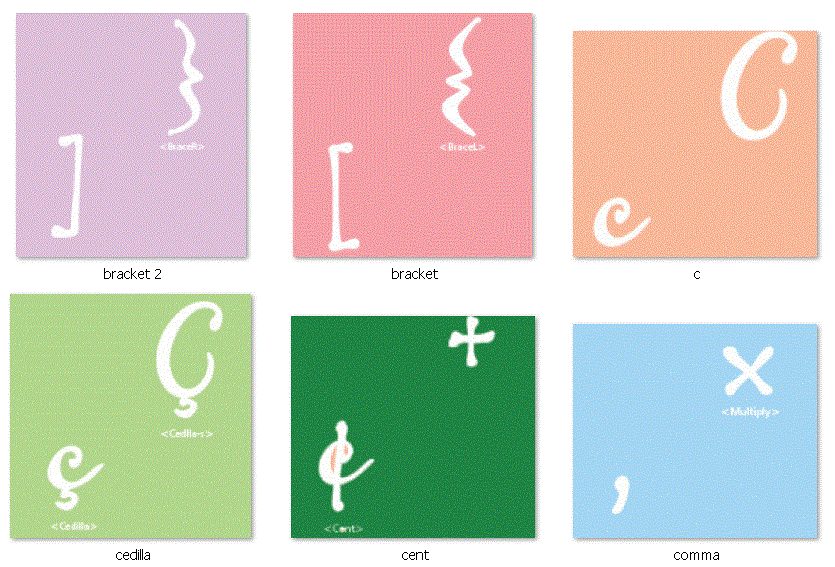
  • The sample sheet provided by Provocraft when you purchase the Gypsy
  • a closer look at the font, numbers and other primary images on the cartridge
  • a view of the handbook with 9 handbook pages per 1, 8.5 x 11 page including a PDF download for your quick reference
  • a look at a handbook page and all the features per key
  
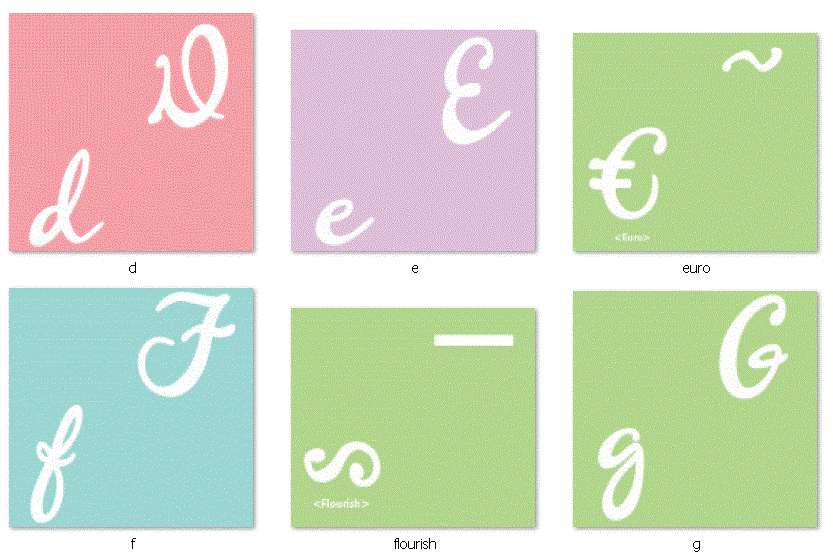
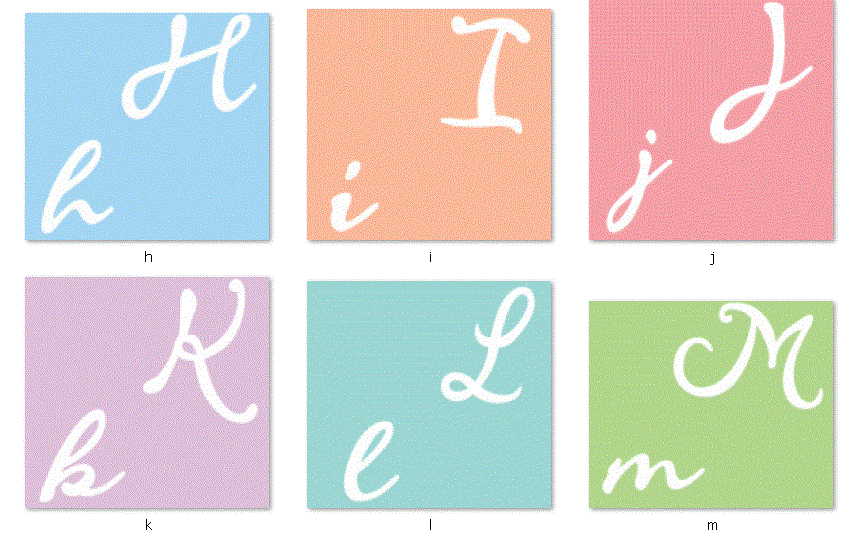
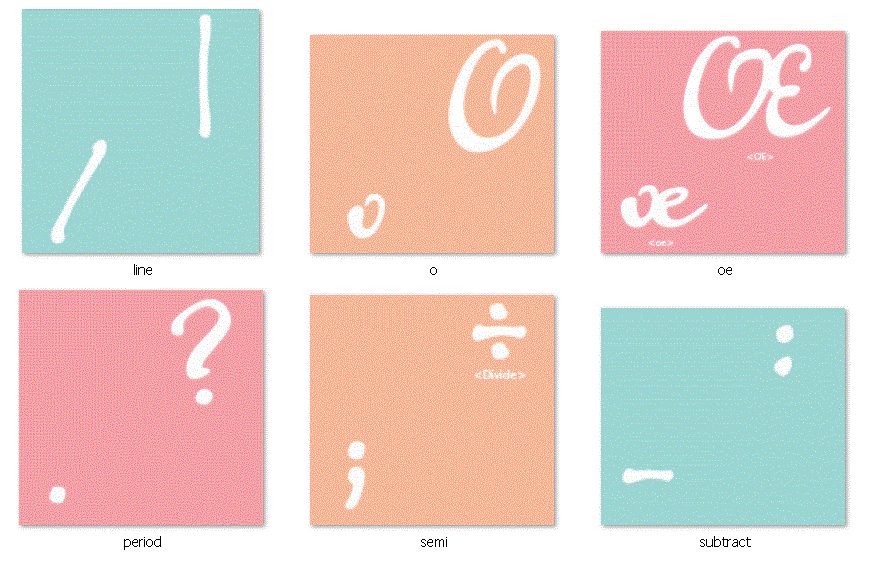
Above is the sample sheet you receive in the box when you purchase a Gypsy.  While it shows you all of the letters and so forth, it doesn't show you everything you really get with the cartridge.  Below is a look at all of the primary images on the cartridge.


I find it helpful to to see the fonts as a collection rather than isolated in a "per page" arrangement.  This allows me to envision the font used in words and welded together.  

Let's take a look at the handbook.  There are 9 pages below; each has 9 handbook pages on it.  
You can download a PDF copy of this Gypsy Font Handbook Reference Sheet by clicking the link below. You should print this out in horizontal orientation. 
 I did not create this configuration- This is the handy work of another devoted cricuteer Patty Goulden. I found this reference PDF through the Cricut message board along with many other cartridge handbooks.  Click here to view this goldmine of Cricut handbook information. Some cartridges are 6 per page and some are 9 per page.  You can view this thread by clicking here.
 Below is a look at a handbook page to show you the images you get when you use the feature buttons.


Each letter is both lower case and capitalized. Coordinating with the primary image letters, you get a shadow and blackout to add dimension.  You also get 2 monograms and monogram shadows in capital letters only and 2 monogram tags with shadows.

Below are 10 images that are included on the cartridge.  Because many of them are abstract, I did not create a table of contents for reference.
  
Let me know if you have any additional questions about this cartridge.  I hope this information is helpful.