Friday, August 17, 2012

Comprehensive Overview of the preloaded Gypsy Cartridge, Gypsy Wanderings for the Cricut

Wow! What a blog title.  Well this is going to be one heck of a post.  Today I am writing about the exclusive Gypsy Wanderings cartridge which is preloaded on the Gypsy.  For those of you who do not own a Gypsy, I am afraid you cannot purchase this cartridge on its own so if you have been on the fence about buying the Gypsy this might be the incentive you need.  In this entry we will look at:
  • a Sample view of the cartridge images
  • a look at all of the pages in the handbook and a pdf download of the handbook with 9 handbook pages per 1, 8.5 x 11 page
  • a link to the handbook on the Cricut website
  • a look at the "scrolls" on this cartridge
  • a look at all of the borders, all of the tags and all of the phrases on the cartridge with PDF downloads of each for quick reference.
  • a cartridge "table of contents" spreadsheet with all of the images and phrases and their page numbers and a PDF version for download
SAMPLE SHEET
This is the sample sheet I found on the Cricut site.  I do not recall if it was included in the box when I bought my Gypsy but is similar to a Cricut Lite reference trifold except it is not as comprehensive. 
Above is a page out of the virtual handbook which you can view here. This cartridge is definitely worthy of a handbook as each image key offers a:
  • primary image and shift image
  • shadows for both primary images
  • a decor tag and shadow
  • 2 tags (non-decor)
  • 2 tag shadows (non-decor)
  • a phrase and shadow
  • a border and shadow.
That is 7 pieces of artwork with shadows, per key (on the Gypsy virtual keypad) and page, (in the handbook.)  That is a lot of images to work with.  Granted, we do see some redundancy of images like hearts, flowers, crowns and butterflies but Gypsy Wanderings is a really great "bread and butter" cartridge- especially once you know what you have to work with!

GYPSY WANDERINGS HANDBOOK
Let's take a look at the handbook.  There are 9 pages below; each has 9 handbook pages on it.  
You can download a PDF copy of this Gypsy Wanderings Handbook Reference Sheet by clicking the link below. You should print it in horizontal orientation.


This is a total of 25 pages, multiply by 7 and you have 175 unique pieces of artwork plus their shadows.  I found this reference PDF through the Cricut message board along with many other cartridge handbooks.  Click here to view this goldmine of Cricut handbook information. 

SCROLLS
Before we take a closer look at the tags, phrases and borders, I want to briefly talk about "scrolls". There are 8 scrolls on this cartridge (they can by found on pages 37, 40, 70, 74) and you will find many more scrolls on other cartridges.  


Maybe it is just me but the title "scroll" is sort of a strange description for these images.  I have no idea what else you would call them, but I mention it because if you use the Cheatsheet (table of contents with page numbers) at the end of this entry and try to search for one of this swirly, curly, flowery, feathery decorative images, I want you to have the right word to use in your search.
BORDERS
Now lets look at the borders.  It used to take me forever to flip through the handbook to find that perfect border so I created a border reference sheet which makes the process so much easier.  You can download a PDF copy of this Gypsy Wanderings BORDER Reference Sheet by clicking the link below. You should print it in horizontal orientation.  If you would like to share this information on your blog, instead of copy and pasting this info, please post a link to my site.


A-DOR-ABLE!  I love the "Be Fabulous" on page 32. Now to use an image as a border on a 12 x 12 layout, you wouldn't want to enlarge the image to 12 inches wide .  This would make the height way to big for a page border. In order to get a long border for larger pages like 12 x 12 paper, you can either cut multiples of the border image and line them up along the edge or you can use Design Studio, Gypsy or Cricut Craft Room to weld multiple copies of the border image together.  To learn more about welding with Design Studio, click here, welding with Gypsy, click here and welding with Cricut Craft Room, click here (these are all excellent youtube video tutorials.

TAGS
Now lets take a look at the tags on this cartridge.  You get a total of 3 unique tags for each key/ handbook page.  There is the "decor tag" key and then 2 primary image related tags from the "tag" key.  Each of these have shadows.  You cut the decorative tag shadow by adding shift and the 2 tag shadows, by selecting the "tag shadow" key.  Below is a view of all of the tags on this cartridge with the handbook page number below it.
You can download a PDF " tag quick reference sheet" below.  You should print it in horizontal orientation. Printing it out will allow you to skim over all of your tag options without having to flip through the digital handbook or a printed copy.  I always find it helpful to see my choices lined up next to one another so I can compare my options quickly. If you would like to share this information on your blog, instead of copy and pasting this info, please post a link to my site.


The "decorative tags" on the left are not primary image related, so you can use them on any project regardless of the theme.  The "tags" on the right have the primary image incorporated into the design and there are two different version to work with. It is worth mentioning that the decorative tags are not limited to just tags.  You also get tabs, buttons, mats, frames, pages and shapes. 

PHRASES
But wait... there's more!!  Now we will take a look at the phrases that come on this cartridge. Below is a view of all of the phrases on this cartridge. You can download a PDF " phrase quick reference sheet" below.  Print this out (You should print it in horizontal orientation.) so you can skim over all of your phrase options without having to flip through the digital handbook or a printed copy.  As always, if you would like to share this information on your blog, instead of copy and pasting this info, please post a link to my site.

 
 These are core phrases and I really like the fonts they selected.

TABLE OF CONTENTS
Last, but not least, here is a list of all of the images and phrases on this cartridge with their page numbers.  If you find any errors in the spreadsheet, please let me know so I can make corrections. If you would like to share this information on your blog, instead of copy and pasting this info, please paste a link to my site. The spreadsheet below is saved as a JPEG but you can download a PDF version of Gypsy Wanderings here:


Wow - that was a lot of information - I hope it is helpful!  Thanks for popping over. It has been really great getting your WONDERFUL comments and I am so happy to see that I am collecting followers. If you haven't already become a follower, please do. It seems silly, but  little things like comments and followers make my day. :o)  I hope you have a great weekend!! Jilliene
 

Thursday, August 16, 2012

Oh no she didn't!

I spent a big part of the day working on the information I am going to post about the Gypsy Wanderings cartridge. But then I got a call from the VP of the HSC and she asked if I had anything new to put on the HSC table at our back-to-school-picnic this evening.  I know I said I wasn't going to do it.... but my creative compulsion got the best of me, and I made a banner.  I used the Birthday Bash cartridge for the flags and Heidi Grace letters.

Sooooo, I have all of the PDF files completed along with the cheat sheet with page numbers for the Gypsy Wanderings cartridge, but I just don't have the brain power to write the actual blog entry.  I will post it tomorrow. This will be a super duper informative post with more information than I have provided in the past.  It will include views of all the tags, borders and phrases with PDF downloads for easy reference, plus a pdf of the handbook with 9 handbook pages per 1, 8.5 x 11 sheet A N D the cheat sheet with page numbers.  If you have ever wondered what this cartridge is all about, tomorrow will be the big reveal. Thanks so much for your patience.

Wednesday, August 15, 2012

Scrapbook Island Flea and Back to School

Boy it has been a busy week...Scrapbook Island, my LSS, is having its annual flea market 8/26 so I spent 3 whole days going through my garage  to locate all the supplies I haven't been using.  This was no small task.  I have this nasty habit of, after completing a large project, putting everything into a box rather than cleaning up properly.  I set the box aside thinking I will take care of it in a day or two, but more times than not, the box finds it's way to the garage where it remains until it is rediscovered.  Sifting through 12 of those boxes was a big job but after it was all done I had 3 tubs of scrapbooking supplies to sell at bargain prices!

To add to the crazyness, I had my first Home and School Club  meeting on Monday.  I am the President of the HSC and I have a lot to do before back to school night on the 27th.  My inclination is to make adorable banners and colorful signage with my Cricut but I have decided to recycle everything I put together last year.  As fun as it is to do those kinds of projects, I need to be practical because I have plenty of other things to take care of.

Hence my brief absence... Tomorrow I will be returning to the blogsphere with another cartridge overview.  One that Cricut Gypsy owners may appreciate.  I will be doing a comprehensive overview of Gypsy Wanderings, one of the two cartridges that come preloaded when you purchase a Gypsy.  I love this cartridge but unfortunately,  they did not include a handbook in the Gypsy box, so I rarely use it.  I'm a visual and tactile person so I guess I need to have a handbook to browse.  There is a virtual handbook online but it isn't the same as having one in your hands to flip through.   Tomorrow's post will be loaded with helpful information to fill in the blanks.  Until then - have a good sleep...


Thursday, August 9, 2012

Comprehensive Overview of Cricut Cartridge "Give a Hoot"

Today we are going to look at the Cricut Cartridge "Give a Hoot."   I love that Provocraft created an environmentally conscience cartridge!  Yay Provocraft!  The more mainstream green living becomes, the more people will  think about changing they way they live.  In this post we will look at:

  • a Sample view of the cartridge images
  • a look at all the borders on the cartridge
  • a Borders Reference Sheet in PDF for download
  • a look at a handbook pages with some explanation of the possibilities
  • a link to the PDF of the handbook
  • a spreadsheet with a list of the images, words and phrases with their pages numbers including a link to download the PDF version.
 A Sample view appears on the back of each cartridge box and usually shows a portion of the images that can be cut with the cartridge; but Give a Hoot shows all of the primary images in its Sample.

In addition to the primary images, this cartridge offers an accent image, a phrase, a border and a charm.  Each of these images includes at least one layer to add contrast and dimension. 

My favorite feature (other than the subject matter) is the border option. Below are all the borders that are included in this cartridge with their page numbers.

It used to take me forever to flip through the handbook to find that perfect border so I created a border reference sheet which makes the process so much easier.  You can download a PDF copy of this Give a Hoot Border Reference Sheet by clicking the link below. You should print it in horizontal orientation.  I am afraid the image quality isn't superb because I used the small image files from the cricut website. If you would like to share this information on your blog, instead of copy and pasting this info, please post a link to my site.

To use an image as a border on a 12 x 12 layout, you wouldn't want to enlarge the image to 12 inches wide .  This would make the height way to big for a page border. In order to get a long border for larger pages like 12 x 12 paper, you can either cut multiples of the border image and line them up along the edge or you can use Design Studio, Gypsy or Cricut Craft Room to weld multiple copies of the border image together.  To learn more about welding with Design Studio, click here, welding with Gypsy, click here and welding with Cricut Craft Room, click here (these are all excellent youtube video tutorials.)

Now lets take a look at a few pages from the Give a Hoot handbook so you can get a feel for what you have to work with. I have added notes to help you understand what each feature key does.

To look at the Give a Hoot handbook you can click here.

Last but not least, here is a list of all of the images and phrases on this cartridge with their page numbers.  If you find any errors in the spreadsheet, please let me know so I can correct it. If you would like to share this information on your blog, instead of copy and pasting this info, please paste a link to my site. The spreadsheet below is saved as a JPEG but you can download a PDF version of Give a Hoot here: 


Tuesday, August 7, 2012

Comprehensive Overview of Cricut Cartridge "Formal Occasion"

Today I will be doing a comprehensive Overview of the Cricut Cartridge "Formal Occasion."  It is filled with a variety of wonderfully unique images.  In this post we will look at:
  • a Sample view of the cartridge images
  • a list of themes you can use the cartridge for
  • a look at all of the frames offered on the cartridge
  • a Frames and Mats Reference Sheet in PDF for download
  • a look at a few handbook pages with some explanation of the possibilities
  • a link to the PDF of the handbook
  • a spreadsheet with a list of the images, words and phrases with their pages numbers including a link to download the PDF version.
A Sample view appears on the back of each cartridge box and usually shows a portion of the images that can be cut with the cartridge; but Formal Occasion shows all of the primary images in its Sample.  What is great is that the artwork on this cartridge is not limited to a dance, prom or "formal occasion.".  You can embellish a lot of different subjects including:
  • sewing
  • Cinderella
  • princess
  • taking photos on vacation or anytime
  • dress up/ little lady
  • girlfriends
  • shopping
  • athletics (high top shoes)
  • favorite music/ band
  • decorative flowers and paisley work on Ba-zillion different subjects as a decorative element
  • heritage / time
  • home
  • the beach / vacation
  • the city
  • cowboy
  • camping/ mountain vacation/ hiking/ nature
  • night/ evening
  • movies/ play
  • love/ romance
and that is just what I came up with in 5 minutes.

In addition to the primary images, you also get frames and mats for your photos and layered phrases like "Prom," "New Year's Eve" and "Dance Until Dawn".  Almost all of the phrases include a mat or frame that matches the photo frame.  Below are all the photo frames/ mats that are included on this cartridge with their page numbers.


All of the frames and mats are layered.  You can use just one of the layers or stack them all to add additional dimension and color.  I turn to Formal Occasion for almost all of my framing needs.  It used to take me forever to flip through the handbook to find that perfect frame to mount a photo or use in a card but I created a frame  reference sheet which makes the process so much easier.  You can download a PDF copy of this Formal Occasion Frames and Mats Reference Sheet by clicking the link below.  If you would like to share this information on your blog, instead of copy and pasting this info, please paste a link to my site.:


Lets take a look at a few pages out of the handbook so you can see how they are laid out:

The Frame options below include 3 mats and one frame which is the wonky oval on the Frame Layer.  If you wanted to cut a more substantial frame, you could pair the mats from this page with a frame from another.  You could also use this little frame on its own to emphasize a word in a title or around the focal point of your photo.
For the example above the word in the phrase can be used alone or with 1 or more of the mats.  The phrase below is not legible unless you cut both the Phrase and the Phrase layer.  Both Layers + shift are not necessary for the phrase to properly reveal the word Homecoming.
The dress image above offers 3 different mat sets.  There is a mat set for the dress, a mat set for the phrase, and a additional mat set (under the Frame options) for your photo although you could use it as a mat on a card or as a decorative element elsewhere.

To get a better look at the handbook, click here to view the handbook in PDF format.

Last but not least, here is a list of all of the images and phrases on this cartridge with their page numbers.  If you find any errors in the spreadsheet, please let me know so I can correct it. If you would like to share this information on your blog, instead of copy and pasting this info, please paste a link to my site. The spreadsheet below is saved as a JPEG but you can download a PDF version of Formal Occasion here:


Sunday, August 5, 2012

Overview of the Cricut Cartridge "My Community"

Today I will be talking about at the Cricut cartridge "My Community" and I will offer a project challenge.  If you have never looked at this cartridge you are in for a treat!  In my opinion, this is one of the most versatile and applicable cartridges Cricut offers.  I can't wait to show you what you get to play with.  In this post you will get:
  • a sample view of the cartridge images
  • a list of the various themes this cartridge can work with
  • a project challenge
  • a look at a few handbook pages with some explanation of the possibilities
  • a link to the PDF of the handbook
  • photos of image layers assembled
  • a spreadsheet with a list of the images, words and phrases, cards and projects with their pages numbers including a link to download the PDF version.

This is the sample sheet Provocraft prints on the back of the box.  Usually their cartridge sample sheets do not show all of the images on the cartridge but on "My Community" they do.  There are 98 layered images with a shadow and a blackout plus a puzzle piece, a tile and a notebook page.  I love the range of topics. You could use this cartridge for so many different themes:
  • school
  • heritage
  • baby
  • Christmas
  • Games
  • projects with kids
  • nursery rhymes
  • family
  • animals / farm
  • home
  • travel /road trip
  • Easter
  • Thanksgiving
  • people
  • nature
  • community
  • railroad and trains
  • vehicles
  • mail
  • firemen
  • policemen
  • shopping
  • ice cream/ candy
  • going out to eat
  • library
PROJECT CHALLENGE - I was returning library books the other day and as I drove past our local park, I saw our mail carrier eating her lunch in the shade and thought; "I need a scrapbook of our neighborhood!"  It would be so fabulous to show my grandchildren where their parents grew up and perhaps, how we lived "in the olden days."   So over the next few days I am going to head out on foot to take photos of the people and places that are a part of our lives. Then I am going to scrapbook these photos using the "My Community" cartridge.  I invite you to join me, and, if you'd like, post a link to photos of your project.  Doesn't that sound like fun! You could do this in your Smash Book, as a mini album, as one or several layouts or in your journal.  I'd love to see what you come up with!

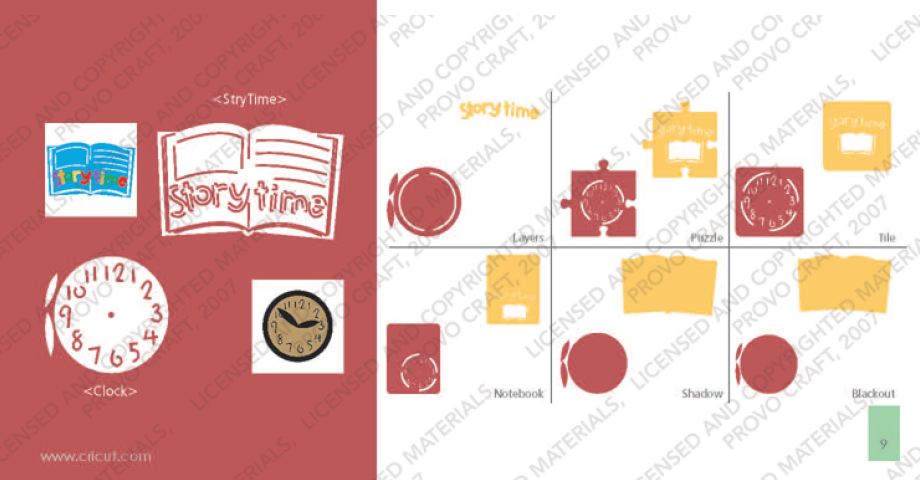
On the page above, which has a matching key on the cartridge overlay, your two primary images are of a police station facade and a policeman (key with shift).  Add the "Layers" feature key and Cricut cuts 2 light posts and a piece of building trim as another layer for the police station. With shift, Cricut cuts the policeman uniform.  Add the "Shadow" or "Blackout" feature key to cut layers to be placed under the primary image.  The "Puzzle," the "Tile" and the "Notebook" feature keys produce the primary image within a puzzle piece, a tile and a notebook page.

To see and download the entire handbook, click here.

Sometimes cutting and layering an image isn't as easy as it looks.  Since I want to offer a truly comprehensive overview of the cartridges, I thought I would cut the two main images from page 9 to see how all the layers work together.
The clock above was assembled with the primary image and the Layer. The clock hands come from the Layer - they seem to be a little large for the clock but could be trimmed and attached with a brad.
The clock face below is made with the primary image, the Layer and the Shadow.  For the hands, I used the primary and the Layer image hands stacked. 

The image below is made with the primary image with the shift key (the white), the Layer with shift (the letters that spell story time), the Shadow (light brown) and the Blackout (dark brown).

 
In order to get the multi-color spelling, I had to cut the Layer 5 times, 1 in each color.


There is not a way to isolate the letters so that you can get multiple colors with one cut unless you use the hide contour feature on Design Studio, Gypsy or Cricut Craft Room.

To do this, you would press "Layer" 5 times and then use the hide contour feature to hide all but 2 of the letters on each of the 5 copies.  Then you would place scraps of paper for each colors on your sticky mat to match the location on your virtual mat.  By doing this, you are not left with a pile of extra letters like shown above.

I cut the story book image at 2.5 inches.  Because the die cut is rather small, the light brown shadow under the primary image does not show through very well to create contrast that appears like lines of text.  With inking or Copic markers you can create this look manually.

Last but not least, here is a list of all of the images and phrases on this cartridge with their page numbers.  If you find any errors in the spreadsheet, please let me know so I can correct it. If you would like to share this information on your blog, instead of copy and pasting this info, please paste a link to my site. The spreadsheet below is saved as a JPEG but you can download a PDF version of My Community here:


Friday, August 3, 2012

Who do you scrap for?

I have been trying to complete the mini album I started using the "Enjoy the Seasons" Cricut Imagine cartridge but it has been challenging with the family summer schedule.  Yesterday I had an hour to do some inking and gluing and I noticed that I was feeling anxious.  Some of the die cut edges didn't match up perfectly and I was having second thoughts about a paper choice that was already glued down and I felt stressed.  I thought to myself "Just who are you scrapbooking for?" and realized that my scrapbook page "audience" has a huge impact on my enjoyment factor and here is why:
  • I scrapbook for clients as a job which means I don't explore the eclectic nor do I allow my creativity to land where it may. Most clients like clean, logical pages with that special something like a custom die cut to match the photo or an interactive element. It is risky to get too artistic because my own voice may show through. I work hard to know and express the client's voice so that the album is truly their memories. It isn't easy.  It beats working in an office everyday but sometimes it can be suffocating.

  • I also do some scrapbooking projects for an internet audience -  I design scrapbook layouts and mini albums to post on my blog or for submission or to post in a gallery. When I do this kind of scrapbooking, I pick the photos that will work best with current products and I focus on the esthetic rather than the story. I hadn't realized it before, but it is stressful.
  •  ...and then I scrapbook for my family. These pages are playful and silly and busy and full of my family's personality. They aren't meticulous like my client or web post work - the designs are carefree. I try to incorporate as many pictures as possible and to generate more pages rather than spending my time getting one layout just so. This is "fun" scrapbooking yet I don't spend much time doing it and when I do, I often put the journalling off for later.
I posted about my audience identity issue on 2Peas today and posed the question "Who do you scrap for?"  I was hoping someone would reply that they have been there, done that, and have found a way to create beautiful pages with all audiences in mind.  Instead, what I read was scrapper after scrcapper saying "I scrap for myself." 

At first I wondered if they really understood the question and then I realized it was me who wasn't getting the answer.  Keddypea wrote:
I scrap for me only. As I journal I do it like I'm talking to the people in the photos or I talk about my feelings of a place/event/object, but it's totally for me. I don't think I could scrap as a job because it would be too stifling for me.
That statement was like an epiphany.  I had been approaching scrapbooking as a product for so long that I had forgotten how to scrapbook like a journal.  By over thinking my audience, I lost sight of using the actual memory, the intimacy in recording it and the joy in translating it into a visual chronicle.   This (re)-discovery will undoubtedly ease my stress with all of my scrapbooking projects because I now have a corrected paradigm to work with.  The tricky part is applying it.  I let you know how it goes.

Over the next few days I will be adding more Cricut cartridge overviews starting with "My Community."  This will also include a fun challenge and a project.