Showing posts with label Cricut cartridge my community. Show all posts

Sunday, August 5, 2012

Overview of the Cricut Cartridge "My Community"

Today I will be talking about at the Cricut cartridge "My Community" and I will offer a project challenge.  If you have never looked at this cartridge you are in for a treat!  In my opinion, this is one of the most versatile and applicable cartridges Cricut offers.  I can't wait to show you what you get to play with.  In this post you will get:
  • a sample view of the cartridge images
  • a list of the various themes this cartridge can work with
  • a project challenge
  • a look at a few handbook pages with some explanation of the possibilities
  • a link to the PDF of the handbook
  • photos of image layers assembled
  • a spreadsheet with a list of the images, words and phrases, cards and projects with their pages numbers including a link to download the PDF version.

This is the sample sheet Provocraft prints on the back of the box.  Usually their cartridge sample sheets do not show all of the images on the cartridge but on "My Community" they do.  There are 98 layered images with a shadow and a blackout plus a puzzle piece, a tile and a notebook page.  I love the range of topics. You could use this cartridge for so many different themes:
  • school
  • heritage
  • baby
  • Christmas
  • Games
  • projects with kids
  • nursery rhymes
  • family
  • animals / farm
  • home
  • travel /road trip
  • Easter
  • Thanksgiving
  • people
  • nature
  • community
  • railroad and trains
  • vehicles
  • mail
  • firemen
  • policemen
  • shopping
  • ice cream/ candy
  • going out to eat
  • library
PROJECT CHALLENGE - I was returning library books the other day and as I drove past our local park, I saw our mail carrier eating her lunch in the shade and thought; "I need a scrapbook of our neighborhood!"  It would be so fabulous to show my grandchildren where their parents grew up and perhaps, how we lived "in the olden days."   So over the next few days I am going to head out on foot to take photos of the people and places that are a part of our lives. Then I am going to scrapbook these photos using the "My Community" cartridge.  I invite you to join me, and, if you'd like, post a link to photos of your project.  Doesn't that sound like fun! You could do this in your Smash Book, as a mini album, as one or several layouts or in your journal.  I'd love to see what you come up with!

On the page above, which has a matching key on the cartridge overlay, your two primary images are of a police station facade and a policeman (key with shift).  Add the "Layers" feature key and Cricut cuts 2 light posts and a piece of building trim as another layer for the police station. With shift, Cricut cuts the policeman uniform.  Add the "Shadow" or "Blackout" feature key to cut layers to be placed under the primary image.  The "Puzzle," the "Tile" and the "Notebook" feature keys produce the primary image within a puzzle piece, a tile and a notebook page.

To see and download the entire handbook, click here.
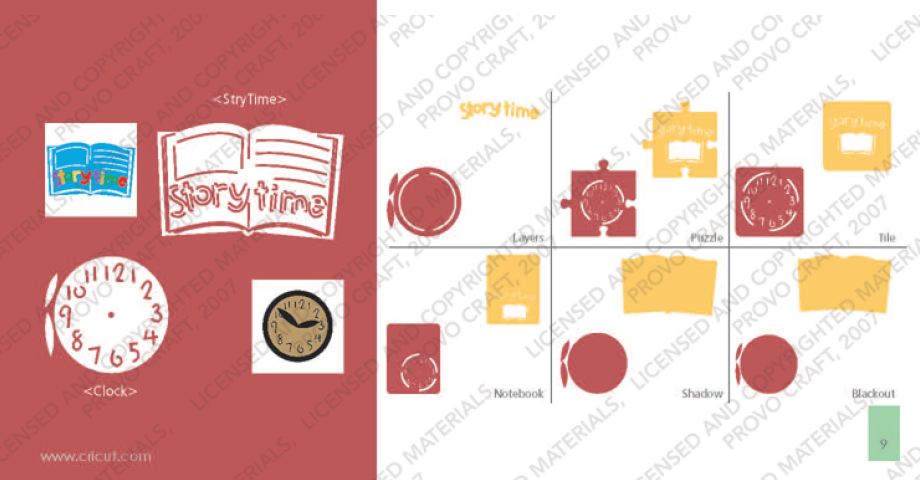
Sometimes cutting and layering an image isn't as easy as it looks.  Since I want to offer a truly comprehensive overview of the cartridges, I thought I would cut the two main images from page 9 to see how all the layers work together.
The clock above was assembled with the primary image and the Layer. The clock hands come from the Layer - they seem to be a little large for the clock but could be trimmed and attached with a brad.
The clock face below is made with the primary image, the Layer and the Shadow.  For the hands, I used the primary and the Layer image hands stacked. 

The image below is made with the primary image with the shift key (the white), the Layer with shift (the letters that spell story time), the Shadow (light brown) and the Blackout (dark brown).

 
In order to get the multi-color spelling, I had to cut the Layer 5 times, 1 in each color.


There is not a way to isolate the letters so that you can get multiple colors with one cut unless you use the hide contour feature on Design Studio, Gypsy or Cricut Craft Room.

To do this, you would press "Layer" 5 times and then use the hide contour feature to hide all but 2 of the letters on each of the 5 copies.  Then you would place scraps of paper for each colors on your sticky mat to match the location on your virtual mat.  By doing this, you are not left with a pile of extra letters like shown above.

I cut the story book image at 2.5 inches.  Because the die cut is rather small, the light brown shadow under the primary image does not show through very well to create contrast that appears like lines of text.  With inking or Copic markers you can create this look manually.

Last but not least, here is a list of all of the images and phrases on this cartridge with their page numbers.  If you find any errors in the spreadsheet, please let me know so I can correct it. If you would like to share this information on your blog, instead of copy and pasting this info, please paste a link to my site. The spreadsheet below is saved as a JPEG but you can download a PDF version of My Community here:


Friday, August 3, 2012

Who do you scrap for?

I have been trying to complete the mini album I started using the "Enjoy the Seasons" Cricut Imagine cartridge but it has been challenging with the family summer schedule.  Yesterday I had an hour to do some inking and gluing and I noticed that I was feeling anxious.  Some of the die cut edges didn't match up perfectly and I was having second thoughts about a paper choice that was already glued down and I felt stressed.  I thought to myself "Just who are you scrapbooking for?" and realized that my scrapbook page "audience" has a huge impact on my enjoyment factor and here is why:
  • I scrapbook for clients as a job which means I don't explore the eclectic nor do I allow my creativity to land where it may. Most clients like clean, logical pages with that special something like a custom die cut to match the photo or an interactive element. It is risky to get too artistic because my own voice may show through. I work hard to know and express the client's voice so that the album is truly their memories. It isn't easy.  It beats working in an office everyday but sometimes it can be suffocating.

  • I also do some scrapbooking projects for an internet audience -  I design scrapbook layouts and mini albums to post on my blog or for submission or to post in a gallery. When I do this kind of scrapbooking, I pick the photos that will work best with current products and I focus on the esthetic rather than the story. I hadn't realized it before, but it is stressful.
  •  ...and then I scrapbook for my family. These pages are playful and silly and busy and full of my family's personality. They aren't meticulous like my client or web post work - the designs are carefree. I try to incorporate as many pictures as possible and to generate more pages rather than spending my time getting one layout just so. This is "fun" scrapbooking yet I don't spend much time doing it and when I do, I often put the journalling off for later.
I posted about my audience identity issue on 2Peas today and posed the question "Who do you scrap for?"  I was hoping someone would reply that they have been there, done that, and have found a way to create beautiful pages with all audiences in mind.  Instead, what I read was scrapper after scrcapper saying "I scrap for myself." 

At first I wondered if they really understood the question and then I realized it was me who wasn't getting the answer.  Keddypea wrote:
I scrap for me only. As I journal I do it like I'm talking to the people in the photos or I talk about my feelings of a place/event/object, but it's totally for me. I don't think I could scrap as a job because it would be too stifling for me.
That statement was like an epiphany.  I had been approaching scrapbooking as a product for so long that I had forgotten how to scrapbook like a journal.  By over thinking my audience, I lost sight of using the actual memory, the intimacy in recording it and the joy in translating it into a visual chronicle.   This (re)-discovery will undoubtedly ease my stress with all of my scrapbooking projects because I now have a corrected paradigm to work with.  The tricky part is applying it.  I let you know how it goes.

Over the next few days I will be adding more Cricut cartridge overviews starting with "My Community."  This will also include a fun challenge and a project.